Picture this: It is Monday morning. You sit at your desk, coffee in hand, and open your inbox. Among the weekend updates and client inquiries, there is a message with a red flag icon.
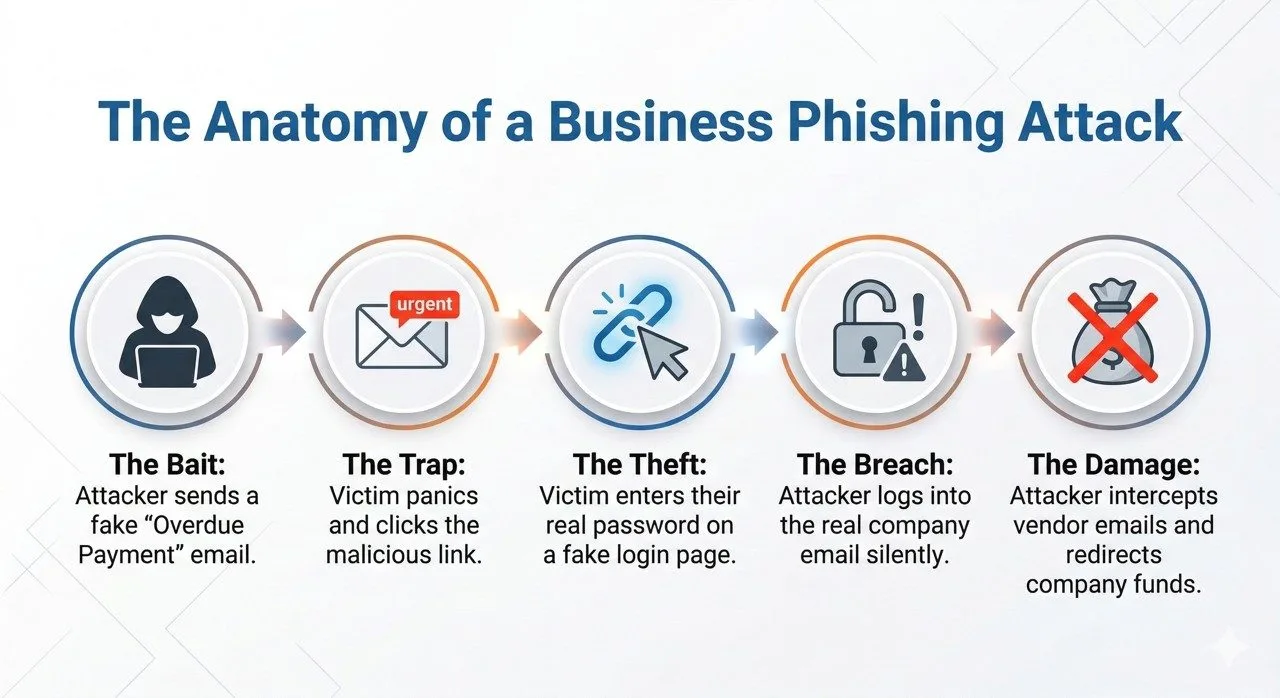
The subject line reads: “URGENT: Final Notice for Overdue Invoice #8842.” Your heart skips a beat. You don’t remember missing a payment. The logo looks right. The tone is demanding. Your instinct is to click the attached PDF to see what you supposedly owe.
If you stop and look closer, you might notice the sender’s email address is a random string of letters, not your vendor’s actual domain. That single moment of hesitation just saved your business from a massive headache.
Email spam and phishing threats are skyrocketing, and small-to-medium businesses are directly in the crosshairs. Attackers know that business owners are busy, often juggling multiple roles, and processing dozens of invoices a week. They rely on that busy environment to slip through the cracks.
In this guide, we are going to look at the reality of business email security. We will break down exactly how to identify phishing emails, what these scams look like, and how you can protect your company email from spam before it ever reaches your team.
Common Types of Spam Emails Businesses Receive
Not all email spam is just annoying advertisements for cheap watches. Today, attackers use highly targeted email scams designed to look like routine administrative tasks. Here are the most common traps businesses face right now.
Fake Invoice Notifications
This is arguably the most common trick in the book. Scammers send a very convincing “past due” invoice from a known brand or a generic-sounding supplier. They bank on your accounting department rushing to settle the bill without verifying the source.
Domain Renewal Scams
If you own a website, you will likely see this one. You receive an official-looking notice warning that your domain name is expiring in 24 hours. The email threatens that your website will go offline unless you click the link and pay immediately. In reality, it is a phishing attack trying to steal your credit card details.
Fake Bank Alerts
These emails mimic popular banks, warning you of “suspicious activity” on your corporate account. They prompt you to log in via a provided link to verify your identity. That link leads to a fake website designed to steal your actual banking credentials.
Suspicious Login Warnings
“Your Microsoft 365 password expires in 2 hours.” These urgent warnings look like they come from your IT department or an email hosting provider. They try to panic employees into handing over their email passwords, granting hackers full access to the company network.
Overdue Payment Notices
Similar to fake invoices, these often pose as legal threats. They use aggressive language, threatening legal action or service suspension if a supposed overdue balance is not paid via wire transfer or cryptocurrency.
How to Identify Phishing Emails
Spotting a phishing email is a skill every employee needs. Hackers are getting smarter, but they still leave behind clues. Here is how to identify phishing emails before they cause damage.
- Check suspicious sender domains: Look past the display name. The sender might say “PayPal Support,” but if the actual email address is
[email protected], it is a scam. - Watch for urgent payment requests: Scammers use artificial urgency to make you panic. If an email demands immediate payment or threatens immediate account suspension, take a breath and investigate.
- Hover over suspicious links: Before clicking anything, hover your mouse over the link. A small box will appear showing the actual destination URL. If it does not match the company’s official website, do not click it.
- Beware of unexpected attachments: Hackers hide malicious software in .zip files, PDFs, and Word documents. If a vendor sends an unexpected attachment out of the blue, call them to verify before opening it.
- Spot generic greetings: Legitimate companies you do business with usually know your name. Emails starting with “Dear Valued Customer” or “Account Holder” should instantly raise a red flag.
What Happens If Someone Clicks a Phishing Link?
It is a business owner’s worst nightmare: an employee admits they clicked a link they shouldn’t have. But what actually happens behind the scenes?
Malware Installation
Clicking a bad link or opening a poisoned attachment can silently download malware in the background. This could be spyware tracking your keystrokes, or worse, ransomware that locks up your entire company network until you pay a massive fee.
Password Theft
If the employee typed their password into a fake login page, the attackers now have the keys to the castle. They can log into the real company email, read sensitive client data, and send out more phishing emails from a trusted internal account.
Website Compromise
If an admin clicks a phishing link and exposes their hosting credentials, attackers can access the backend of your business website. They might deface the site, steal customer data, or use your server to host their own illegal files.
Financial Fraud
This is the ultimate goal of most email fraud. Once hackers are inside your email system, they can intercept real invoices, change the bank routing numbers, and trick your clients into sending payments directly to the hacker’s offshore accounts.
How Businesses Can Protect Their Email
You cannot stop scammers from trying, but you can build a wall around your inbox. Strong spam email protection requires a mix of technology and human awareness.
Implement Aggressive Spam Filtering
Do not rely on default settings. A robust spam filter catches the vast majority of junk before it even hits your inbox. It scans for known malicious IP addresses, dangerous attachments, and spammy keywords.
Set Up SPF, DKIM, and DMARC
These sound highly technical, but think of them as digital ID cards for your email.
- SPF tells the world which servers are allowed to send email on your behalf.
- DKIM adds a digital signature to your emails so they cannot be tampered with.
- DMARC tells receiving servers what to do if an email fails the first two checks. Having these records set up properly stops scammers from spoofing your domain and protects your business reputation.
Invest in Staff Awareness Training
Your security is only as strong as your most distracted employee. Regular, brief training sessions on how to spot email scams can drastically reduce your risk. Teach them the habit of verifying unexpected requests.
Verify Suspicious Emails Manually
Create a strict internal rule: If an email asks for a change in payment details or a wire transfer, verify it via a phone call. Use the phone number from your official records, not the number listed in the suspicious email.
Run Email Security Monitoring
Keep an eye on login locations. If your team is entirely based in Malaysia, but you see successful logins happening from Eastern Europe at 3 AM, your business email security has been breached.
How Hosting Providers Help Reduce Spam Risks
Managing all this security by yourself is overwhelming. That is exactly where a reliable hosting provider steps in. At ServerFreak, we treat your email security as seriously as you do.
Proactive Email Spam Filtering
We use advanced filtering systems right at the server level. This means we intercept and block thousands of malicious emails, fake invoices, and phishing attacks before they ever reach your local devices.
Secure Hosting Infrastructure
Our servers are built with strict security protocols. We actively monitor network traffic and block known malicious networks from communicating with your hosted email accounts.
Malware Protection
If a malicious file attempts to pass through our mail servers, our integrated anti-malware scanners work to quarantine the threat, protecting your team from accidental downloads.
Security Monitoring
We continuously monitor server health and security events. If we detect unusual patterns or compromised accounts sending outbound spam, we can isolate the issue quickly to protect your domain’s sending reputation.
Conclusion
The reality of running a business today means dealing with email threats. Scammers are always going to cast a wide net with fake invoices and urgent warnings, hoping you will make a split-second mistake.
By understanding how these phishing attacks work, educating your team, and implementing strong email security for businesses, you take the power away from the attackers. Stay vigilant, always hover before you click, and partner with a hosting provider that actively fights spam on your behalf.
Frequently Asked Questions (FAQ)
What is the difference between email spam and a phishing email?
Email spam is generally unwanted bulk marketing or junk mail. It is annoying but usually harmless. A phishing email is a targeted cyberattack designed to steal sensitive information, passwords, or money by tricking the recipient into taking an action.
How can I protect company email from spam effectively?
Start by using a reputable email hosting provider with server-level filtering. Additionally, ensure your domain has properly configured SPF, DKIM, and DMARC records, and never publish your raw company email addresses publicly on your website without protection.
What should my employees do if they click a phishing link?
They should immediately disconnect their computer from the company network (turn off Wi-Fi or unplug the cable) and notify IT or management. They must then change their email passwords immediately from a safe, separate device, and run a full antivirus scan on the compromised machine.
Hand-picked related articles
Email Spam and Phishing: The Ultimate Security Guide for Businesses
Picture this: It is Monday morning. You sit at your desk, coffee in hand, and open your inbox. Among the…
Ways to Improve Your Site’s Ranking (SEO)
Use these actionable tips to take your SEO to the next level and send your website ranking up to the top of the search engine rankings. Gain more visibility, drive organic traffic, and set your…
Benefits Of SEO
Whether it's a new business or growing one, just think of your business popping up on the first page when…
Who Should Use Shared Hosting
If you fall into any of the categories below, shared server hosting might be suitable for you: 1. Small Businesses…